
your team and key people are already inside
Ping — a fast and secure messenger
Chat and share what matters with the people closest to you and your team in one clear, protected space.
iOS
Android
Desktop
Web



it does not compete with your everyday messenger
critical updates do not sink in the chat flow
you can see who is inside and who was invited
Why Ping matters
When a team needs a work chat, order matters more than noise
People search for a corporate messenger or a secure work chat not because they want another app. They usually need a separate channel where the team is already together, the member list is clear, and important updates do not sink into everyday chatter.
How it works
First you gather the team or your own circle. Then the work chat is always within reach
Ping works as a separate corporate messenger and secure work chat: the people, announcements, and direct messages are already there when you need fast coordination.
01
Create a space for the team
Add the people who need to stay in touch in a work or private circle.
01
02
03
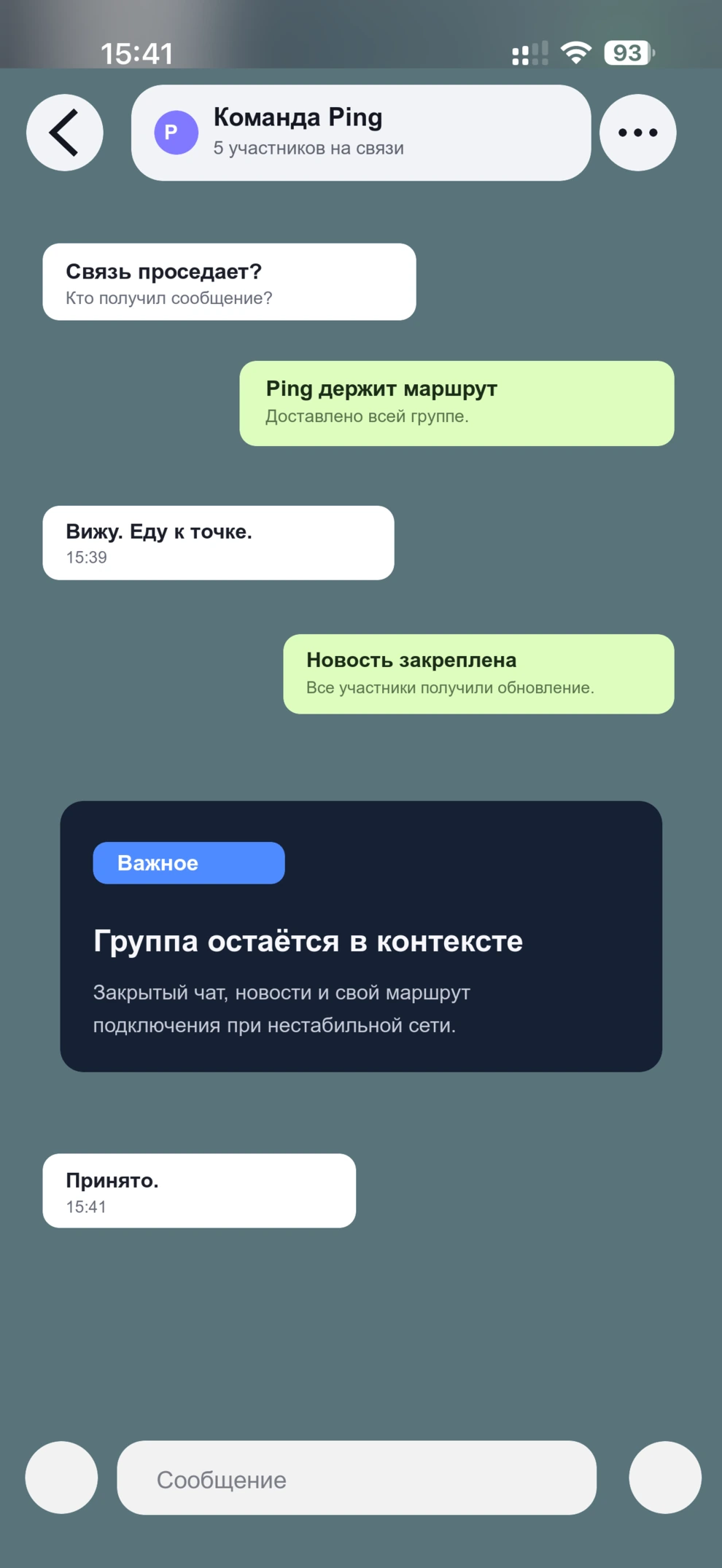
Create a space for the team
Add the people who need to stay in touch in a work or private circle.
Separate announcements, the main chat, and direct messages
Important updates stay visible while routine messages do not get in the way of coordination.
Use it when you need to coordinate fast
When you need a separate work channel, your circle is already gathered and ready.
What stays close at hand
Corporate messenger, announcements, and direct messages in one place
Ping brings together the core work-chat scenarios: a shared team channel, separate announcements, and fast direct conversations without switching between tools.

Shared team chat
The main conversation for the whole group, shift, or project in one place.
Announcements apart
Important messages do not disappear inside discussions and side questions.
Private messages
Move into a direct conversation with a member without leaving Ping.
Invite-only access
The member list is clear from the start and is not diluted by random links.
Who it is built for
For teams, parents, and private communities
Teams, shifts, and projects
Useful when a company needs a messenger for work: coordination, announcements, quick questions, and a clear member list.
Parents and classrooms
Schedules, announcements, and urgent messages stay inside a clear trusted circle.
Organizations and internal groups
Comfortable where controlled access, announcements, and a clear working circle matter.
Clubs and local communities
Keeps your people, news, and discussions close without random participants or extra noise.
Your security
Privacy under your control
You control access to spaces, participants, and your devices.

- Private spaces
- A clear member list
- Access control
Why it works
Why Ping fits as a work chat and corporate messenger
Ping is built for situations where coordination, clear access, and a separate channel for important people matter. That is why it feels calmer than one more all-purpose chat.
-
01
Roster
You can see who is on the team
Only the people who actually need to stay connected are inside.
-
02
Focus
Important things do not get lost
Announcements do not mix with everyday chat.
-
03
Channel
There is a separate work channel
You can prepare it early instead of building it in a rush.
-
04
Private
Private messages stay close
Move into a one-to-one conversation without losing the shared context.
-
05
Access
Entry is by invitation
Membership is controlled from the start.
-
06
Calm
Less noise in the work chat
Important messages do not drown in random side conversations.
-
07
Coordination
Built for coordination
Useful for shifts, projects, field trips, and small teams.
-
08
Flexible
Useful for families and classrooms too
Schedules, announcements, and urgent questions stay in one place.
-
09
Transition
You do not need to move every conversation
Everyday chats can stay where they already are.
-
10
Ready
The team is ready in advance
When you need to reach people quickly, you do not need to gather them again or create a new chat.
Ping Journal
Stories about work chat, security, and Ping use cases

Ping открыл набор участников для тестирования приложения на Android
Владельцы Android-устройств могут присоединиться к закрытому тестированию Ping через Google Play. Для доступа нужен email аккаунта, выбранного в Google Play на устройстве участника.
Read article
How Ilya Serdyukov Is Building PING: A Messenger You Can Rely On
PING appeared after staying in touch with loved ones in Russia from Spain became unpredictable. A personal problem turned into an independent engineering project.
Read article
Ping: Location Sharing, Live Location, and Route Recording in Chat
Ping lets you send your location, turn on live location, and share a route with friends right in chat. Convenient for meetups, trips, and staying in touch on iPhone.
Read articleQuestions
Questions about Ping as a work chat and secure messenger
Is Ping a corporate messenger or just another chat?
Ping is closer to a corporate and coordination scenario: it is a separate space for a team, family, or private group where the shared chat, announcements, and direct messages stay together.
Does Ping fit as a messenger for work?
Yes. It is useful for small teams, shifts, projects, and internal groups where a clear member list, separate announcements, and quick direct clarifications matter.
Does Ping work without the internet?
No. Ping does not replace internet connectivity. Its role is different: to provide a prepared separate chat when familiar channels become unstable.
How is Ping different from a typical work chat?
In Ping, important updates are separated from routine conversation: announcements do not get lost, the member list is visible, and you can move into a private conversation without leaving the shared space.
Can Ping replace Telegram for a private group?
Yes, if you need not a mass messenger, but a separate secure chat for your own circle with invitations and announcements.
Can Ping be used for parents and classrooms?
Yes. Ping suits parent chats, school groups, and announcements when communication should stay inside a clear circle.
What makes Ping safer for a private group?
Safety here starts with clear access: you can see who is in the group, invitations are controlled, and the work chat and announcements stay inside one space.
How do you start using Ping?
Create a space, invite members, and set up the shared chat, announcements, and direct conversations for your team or group.

Hi! I’m Pingo
I’ll be here to make getting started with Ping simple and communication fast and calm.
Ping for your devices
Start chatting in Ping today
Choose the version for your device or scan the QR code.
Download links are coming soon.